How to make a Russian-language main image for Ozon with AI (3:4, with Russian text)
Pick a 3:4 portrait image, prepare the Russian text yourself and have the AI copy it exactly, and make sure the quantity and size shown match the real product. We turned a pink gift bag photo into an Ozon-style main image. Russian text table, prompt and pre-listing checklist included.
Published · 3 min read
Short answer: Generate a 3:4 portrait image; prepare the Russian title, quantity and specs yourself, give them verbatim and ask for them to be "spelled exactly as given"; and make sure the quantity and size shown match the real product. With GPT Image 2.6 Sunburst we turned an ordinary gift bag photo into an Ozon-style Russian main image, and all four pieces of Russian were correct on the first try.
The test: a pink gift bag into a Russian main image
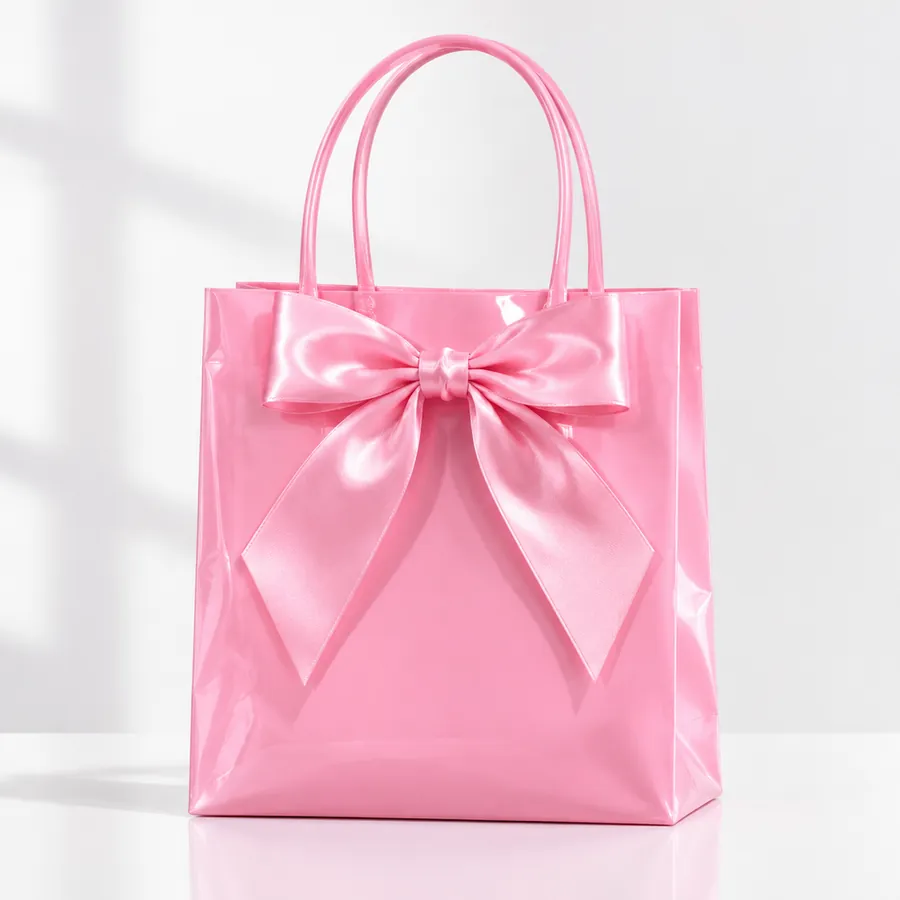
The original is a casual photo of a pink plastic gift bag with a bow on a white table. We uploaded only that photo, chose 3:4 (960×1280) and asked for a main image for a set of 30.
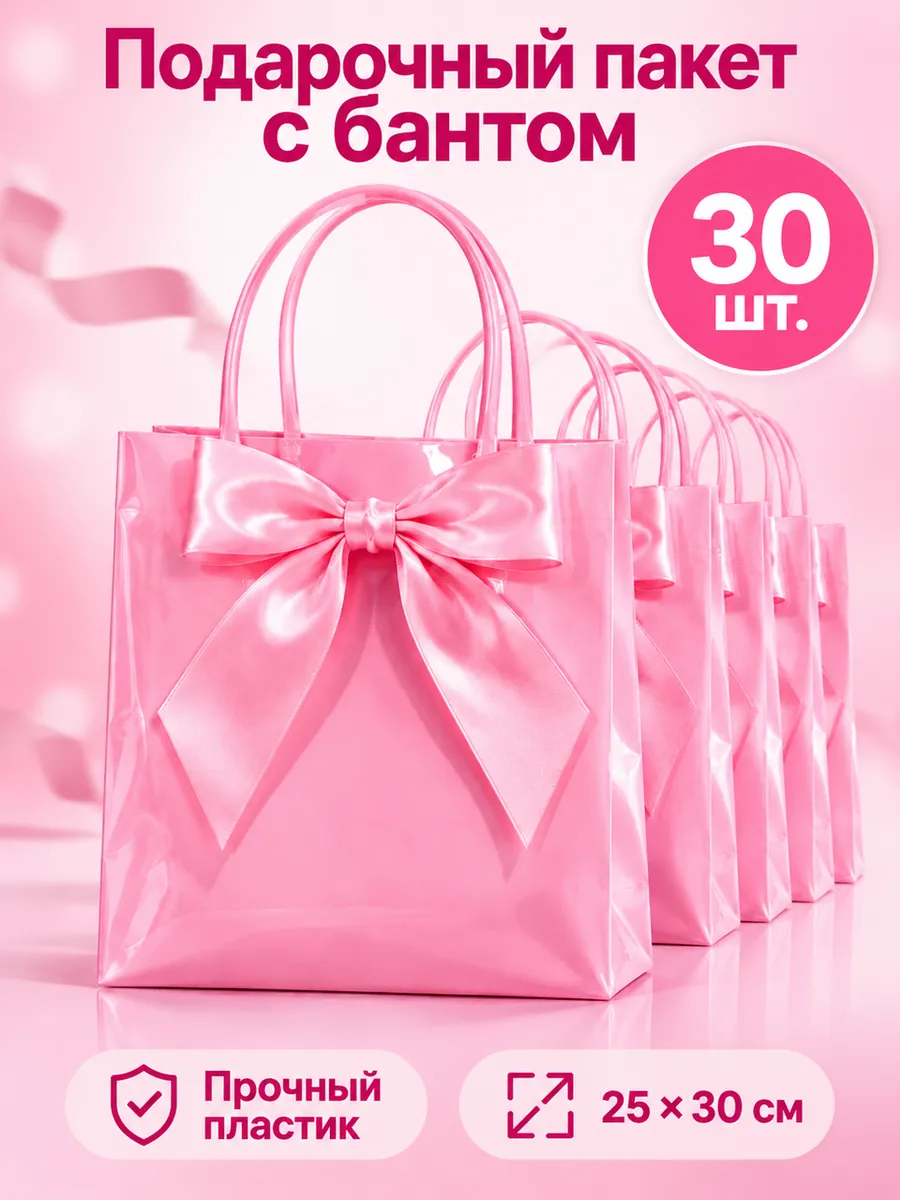
The Russian on the image matches what we supplied:
| Where | Russian | Meaning |
|---|---|---|
| Title | Подарочный пакет с бантом | Gift bag with a bow |
| Badge | 30 шт. | 30 pcs |
| Spec 1 | Прочный пластик | Durable plastic |
| Spec 2 | 25 × 30 см | 25 × 30 cm |
The bag kept its colour, gloss, bow and handles. A row of identical bags behind it signals a set, and each spec got a small icon.
A prompt you can reuse
Turn this photo into a vertical 3:4 Ozon marketplace main image for a set of pink gift bags with a bow. Keep the bag exactly as in the photo: same pink, gloss, bow and handles. Show one bag large in front and a neat row of identical bags behind it to suggest a set. Soft pink-to-white background. Add Russian text, spelled exactly as given, in a bold clean Cyrillic sans-serif: a headline at the top reading Подарочный пакет с бантом ; a large round badge reading 30 шт. ; and two short lines at the bottom, each with a small simple icon, reading Прочный пластик and 25 × 30 см . No other text, no Chinese or English, no price, no logo.
This is the exact prompt behind the example.
Six rules for Ozon main images
- Generate 3:4 directly. Ozon product cards favour portrait images and 3:4 is the usual recommendation; check Seller Center for the current requirements. The Miku AI workspace has a 3:4 ratio option.
- Supply the Russian; have the AI copy it. Don't write "add a selling point in Russian". Give the full Russian text and ask for an exact copy.
- Spell out numbers and units. Quantities (шт.), sizes (см) and volumes (мл) are what models most often change. List each one.
- Quantity and size must match the real product. If the image says 30 pieces and 25 × 30 cm, the product must be exactly that. The example shows a row of bags to signal a set; make sure that cannot mislead buyers about what they get.
- Keep the text short. One title, one badge and two or three specs; the rest belongs in the listing description.
- Check every character. Russian letters like и/й, е/ё and ш/щ are easy to confuse. Back-translate the image text or ask a Russian reader.
How Miku AI users make Ozon images
Over the last 30 days, every Ozon or Russian product image task on Miku AI included a reference image: upload the product photo, turn it into a Russian main image or spec sheet. GPT Image 2 was the most used model. Typical work: main images for gift bag sets, moving Russian text and graphics from one image to another, and laying out a full Russian product description as a spec image.
FAQ
Should I use 3:4 or 1:1?
Ozon usually recommends 3:4, which also takes more space in the product card. If the same image goes to a square-image marketplace like Shopee, generate separate 3:4 and 1:1 versions rather than cropping, which can cut off text.
Will the AI get the Russian wrong?
It can. Ours was correct in all four places, but similar letters and word endings are easy to get wrong. Prepare the text, ask for an exact copy and check the result.
Does this work for Wildberries?
Yes, the same way: prepare the Russian, use the ratio the marketplace recommends and ask for an exact copy. Each marketplace has its own main-image rules, so check them before listing.
Can I turn an existing Chinese main image into Russian?
Yes. Upload it and write "change [Chinese line] to [Russian line], keep the font style, size, colour and position" for each line. See How to edit the text in an image with AI and keep the original font.
Which model should I use?
The example used GPT Image 2.6 Sunburst; Miku AI users most often use GPT Image 2. See pricing; failed generations are refunded automatically.