How to edit the text in an image with AI and keep the original font
Upload the original, write "change A to B" line by line and ask for the same font, size, colour and position, and AI will rewrite the text without redoing the design. We changed three lines on a bakery price card. Prompt, checklist and FAQ included.
Published · 3 min read
Short answer: Upload the original and write "change [old text] to [new text]" for each line, quoting the old text exactly, then ask to "keep the same font, stroke weight, size, colour and position, and leave everything else unchanged". In our test with GPT Image 2.6 Sunburst, all three lines on a brush-lettered Chinese price card changed correctly in one go, with the lettering style and layout kept.
The test: three lines on a bakery price card
The original is a kraft-paper price card reading 限时特惠 (limited-time offer) / 招牌牛角包 (signature croissant) / ¥12. We changed it to 新品上市 (new arrival) / 抹茶牛角包 (matcha croissant) / ¥15, uploading only the original.
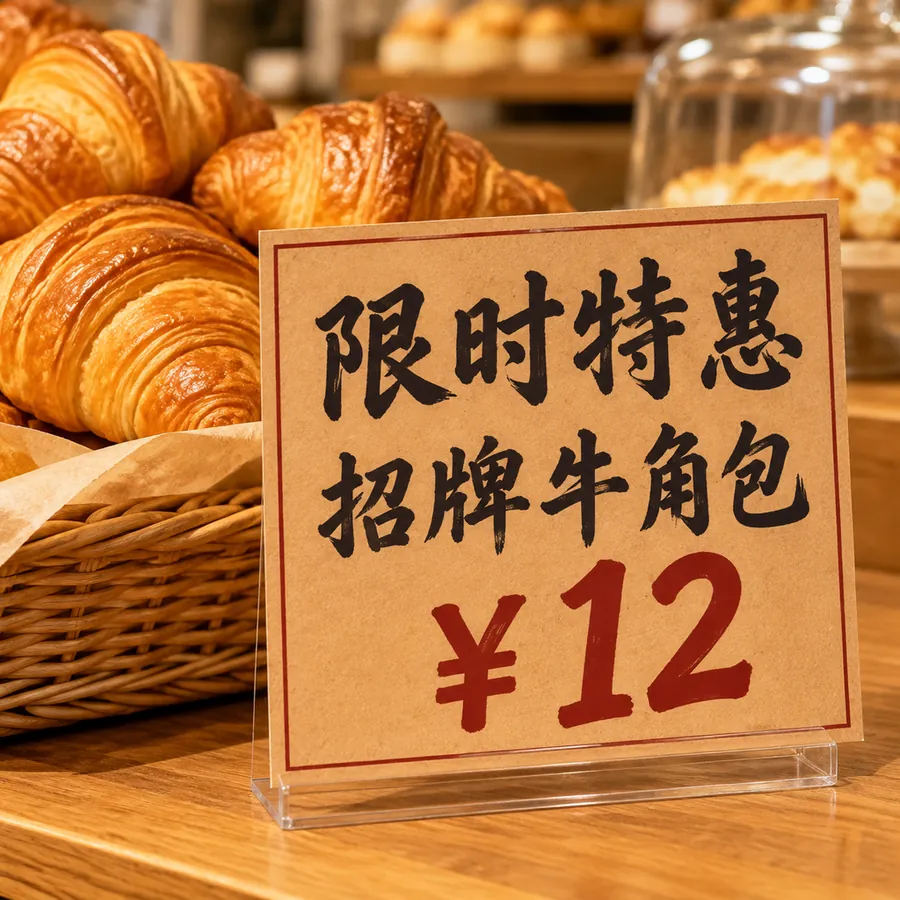
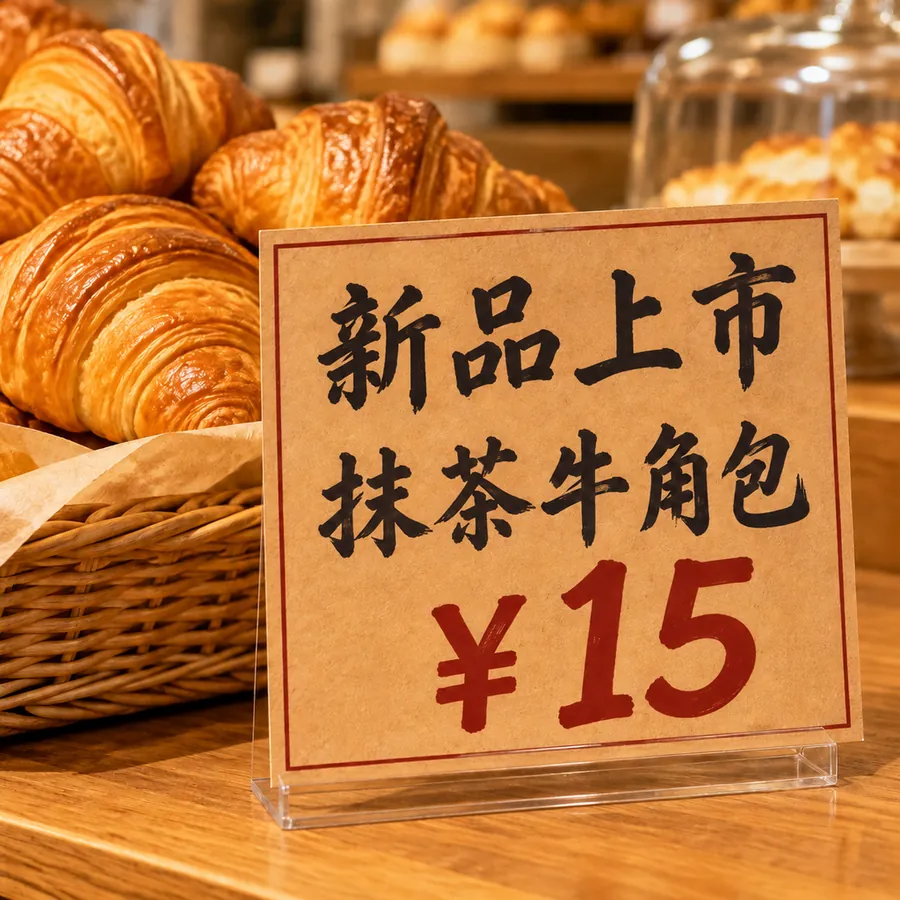
Result:
- All three lines changed correctly, with no wrong or missing characters.
- The black brush lettering, stroke weight, line spacing and red price all match the original.
- The croissants, basket, card border and background did not change.
A prompt you can reuse
Edit only the text on the kraft paper price card. Change the first line 限时特惠 to 新品上市. Change the second line 招牌牛角包 to 抹茶牛角包. Change the price ¥12 to ¥15. Keep the same black brush calligraphy font, stroke weight, character size, colour and position for each line, and the same dark-red colour for the price. Leave the croissants, the card, its border, the lighting and the background unchanged.
This is the exact prompt behind the example.
Six rules for text edits
- Quote the old text exactly. The model has to find what to change; a misquoted line may get edited in the wrong place.
- One line at a time. "Change the first line to…, the second line to…" beats "replace the text with…".
- Spell out the typography. Font style, stroke weight, size, colour, position, alignment.
- Fewer changes, better results. Prices and dates succeed most often. Rewriting a whole paragraph is riskier; split it into several edits.
- Zoom in on small text. Headline-size text is reliable; small print like ingredient lists is where mistakes happen. Check every character.
- Use 2K when there is a lot of text. Thin strokes blur at 1K.
Switching to a different font
Upload two images: image 1 is the design to edit, image 2 shows the target lettering. Write "change the font and colour of the title in image 1 to match image 2, keep the wording and everything else the same". Miku AI users do exactly this for shop signs and posters.
How Miku AI users edit text
Text-edit tasks on Miku AI over the 30 days up to 10 November 2026:
- 97% included a reference image. Text editing is almost always "upload the original and change it".
- About 57% of prompts asked for things to stay the same or for the font to match.
- GPT Image 2 was used most (about 60%), then GPT Image 2.5 Flare and GPT Image 2.5 Sunburst.
- About 64% used 1K output.
Typical edits: prices, phone numbers and dates; the shop name on a sign; a poster headline for a new campaign; English UI text in a game screenshot translated into Chinese.
FAQ
Will the AI change other parts of the image?
It can redraw small details. Say "do not change the card, the background or the product", then compare side by side with the original. In our test nothing else changed visibly.
Does it work for other languages?
Yes. English and numbers are the most reliable. For Traditional Chinese, Japanese, Thai, Russian and others, give the exact text and ask for it to be "spelled exactly as given", then check every character. See Thai product images for Shopee and Russian main images for Ozon.
What if a number or price comes out wrong?
Generate again, or fix just that one item in a second edit. Always check prices by hand before listing.
Which model is best for text edits?
The example used GPT Image 2.6 Sunburst. Miku AI users edit text most often with GPT Image 2. See pricing; failed generations are refunded automatically.