How do I make a character turnaround sheet with AI? Front, side and back view prompts
Ask for front, side and back full-body views side by side at one scale on a plain background. Real Miku AI data, model comparison and prompts.
Published · Updated · 5 min read
Short answer: Upload the character as a reference image and ask for "a turnaround sheet of the character in image 1: front, full side profile and back views, full body, left to right, same scale with heads and feet aligned, plain white background, outfit and colours identical to image 1", in a 16:9 frame. On Miku AI, 181 people ran 1,866 turnaround tasks in the last 30 days. GPT Image 2 was used most and succeeded about 83% of the time.
What a turnaround sheet needs
A turnaround is the reference sheet used for 3D modelling, animation, figure prototypes or later illustrations. Consistency matters more than looks:
- All three views show the same character: face, hair, outfit, accessories.
- All three are the same size, with the top of the head, shoulders, waist and feet on the same lines.
- The side view is a true profile (90 degrees), not a three-quarter view.
- The back view hides the face but shows the back of the hair and the outfit.
- The background is clean, with no scenery or props.
Spell all of this out. The model will not follow turnaround conventions unless you ask.
What Miku AI users did
We looked at tasks on Miku AI in the 30 days up to 12 November 2026 whose prompts asked for a turnaround, character sheet or front/side/back views: 1,866 tasks from 181 users. Tasks were grouped by prompt keywords, and models with fewer than 20 tasks are not listed. "Success" means an image was produced, not that the three views matched.
| Model | Tasks | Success | Median time | Credits per 1K image |
|---|---|---|---|---|
| GPT Image 2 | 926 | 82.5% | ~69 s | 0.3 |
| GPT Image 2.5 Sunburst | 548 | 76% | ~84 s | 0.3 |
| GPT Image 2.5 Flare | 132 | 78% | ~55 s | 0.3 |
| GPT Image 2.6 Sunburst | 117 | 81% | ~63 s | 0.3 |
| Nano Banana 2 | 47 | 83% | ~66 s | 0.25 |
| Nano Banana Pro | 29 | 41% | ~93 s | 0.35 |
| GPT Image 2.6 Flare | 26 | 92% | ~52 s | 0.3 |
What stands out:
- GPT Image 2 has the largest sample and about 83% success, but about 11% of its tasks were refused by content moderation, the highest share among these models.
- GPT Image 2.6 Flare had the highest success rate and the fastest median time; Nano Banana 2 is the cheapest. Both have fewer than 50 tasks.
- Nano Banana Pro did worse on this job: about four in ten of its 29 tasks produced an image.
- About 77% of tasks used reference images, with a median of two.
- 16:9 was used for about 69% of tasks, which fits three full-body figures in a row. About 52% were 1K, 34% 2K and 15% 4K.
Step by step in the workspace
- Upload the character as image 1, ideally a full-body front view with the whole outfit visible.
- If you have close-ups of the outfit or a prop, upload them as image 2 and image 3 and say in the prompt what each one is for.
- Pick a model, for example GPT Image 2 or GPT Image 2.6 Flare, and set the frame to 16:9.
- Use 2K when the outfit is detailed; at 1K, accessories on three small figures blur.
- If one view is wrong (say, an extra pocket on the back), upload the result as a reference and use "Mask edit" to repaint only that area.
Prompt templates
With a reference image:
Create a character turnaround sheet of the character in image 1. Left to right: front view, full side profile facing right (90 degrees), back view, all full body at the same scale with the top of the head and the feet on the same line, relaxed standing pose with arms slightly away from the body. Face, hair, outfit, colours and accessories identical to image 1; show the back of the hair and the print on the back of the jacket. Plain white background, flat even lighting, no shadows or scenery. Label each view underneath: "Front", "Side", "Back".
Designing a new character from text:
Character turnaround sheet: a woman in her early twenties who works as a mechanic, short dark brown hair, orange coveralls with sleeves rolled to the elbow, a tool pouch on her belt, black work boots. Front, full side profile and back views side by side, same scale, A-pose, plain light grey background, clean line art with flat cel-shaded colour.
Common mistakes
- The outfit changes between views. Write "identical to image 1" and list key accessories one by one.
- The side view turns into a three-quarter view. Write "full side profile, 90 degrees".
- Views at different sizes. Write "same scale, heads and feet aligned".
- Scenery creeps in. Write "plain background, no scenery or props".
- Asking for six views plus expressions at once. Get the three views first; do expressions on a separate sheet.
- Refused by moderation. Review how the outfit and pose are described and try a more neutral wording.
Additional composition illustration
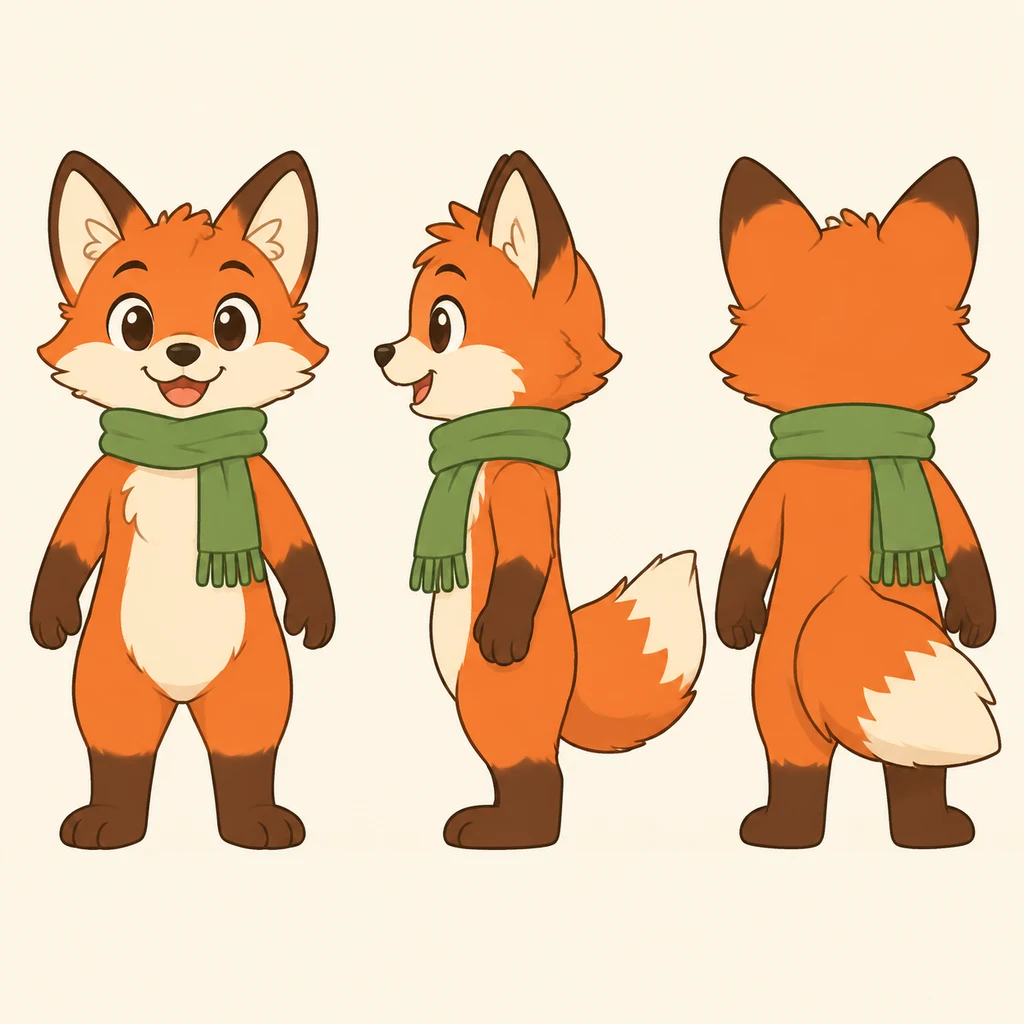
Compare body proportions, scarf and tail across front, side and back views before judging stylistic consistency. This independently generated illustration is not a before-and-after result from the original test and is not included in its statistics.
FAQ
Which model works best for turnaround sheets?
In Miku AI's last 30 days, GPT Image 2 was used most, with about 83% success. GPT Image 2.6 Flare (26 tasks) reached about 92% and Nano Banana 2 (47 tasks) about 83%. Nano Banana Pro had a low success rate on this job.
Which aspect ratio should I use?
Most people chose 16:9, which fits three full-body views in a row. For only front and back, 3:4 or 1:1 works.
Can I use the sheet to generate the same character in new scenes?
Yes. Upload the sheet as a reference, write "keep the face and outfit of the character in image 1", then describe the new scene. For mixing several images, see how to combine two photos naturally.
Am I charged if a generation fails?
Credits are taken on submit and refunded automatically on failure. On models with a content-policy rule, a content-violation failure may not be refunded. See pricing.